Live AI e-learning for beginners

Learn AI online — even if you're not technical at all.

Live, friendly AI courses and e-learning for ages 12 to 92. We teach on video while you follow along in your own browser — build a website, video, or app with AI, and leave with something you made.

Every student gets a pre-configured online learning environment with everything already installed. Open a link in your browser — no downloads, no setup, no IT headaches.

Loved by learners across three generations.

Course 01

Build a website with AI

3–5 hours · Ages 12+

Course 02

Make a short film

3–5 hours · All ages

Course 03

Launch your first app

3–5 hours · Ages 14+

Luckycoin lucky cat mascot

How it works

No tech skills required. We handle the setup.

These AI courses are for everyday people — not IT professionals. You get a pre-configured place to learn, a live instructor on video, and a finished project by the end. Here's what that means in practice.

Built for people who aren't technical

You don't need to know AI, coding, or how computers work. If you can use email and browse the web, you're ready. We explain everything in plain English — no jargon, no rushing.

Your workspace is ready before you arrive

When you enrol, you get access to a private online learning computer in the cloud. Every app and tool for the AI course is already installed and set up. You won't download software or wrestle with settings.

Live video lessons with a real instructor

We teach live on screen — you watch, follow along, and ask questions as you go. It's like a small workshop on video, not a lonely video you watch alone at home.

Everything runs in your browser

Open a link, sign in, and you're in your e-learning environment — from home on a laptop, tablet, or any modern browser. Nothing to install on your own machine.

In short: book a course, open the link we send you, join the live session, and build something real — with help at every step.

Live AI courses

Pick a path. We'll walk it with you.

Live, instructor-led AI e-learning for non-technical learners. Your cloud workspace is ready before the first lesson — pick a date and we'll walk you through it step by step.

Build Your Own Website with AI

Learn how to build a professional website using AI, with no coding experience required. Create designs, content, and website features using modern AI tools. Build a user login system and product catalogue. Learn website security basics and how to publish your site online. Leave with a live website and the skills to continue building independently.

£60

Available dates

  • AugustTue, 4 Aug 202614 places left
    Enrol
  • August 6Thu, 6 Aug 202615 places left
    Enrol
  • August 11Tue, 11 Aug 202615 places left
    Enrol
  • August 13Thu, 13 Aug 202615 places left
    Enrol
View course details Register interest with your preferred date

Mobile App Creation

Learn how to create a fully designed mobile app using AI, with no coding experience required. Design app screens, features, and user experiences using modern AI tools. Connect your app to a backend database and services. Learn how mobile apps store data, manage users, and work in the real world. Leave with a working mobile-ready app and the skills to continue building your own projects.

£60

Available dates

  • August 5thWed, 5 Aug 202615 places left
    Enrol
  • August 12thWed, 12 Aug 202615 places left
    Enrol
View course details Register interest with your preferred date
Three generations learning together
Luckycoin lucky cat mascot

"Gran made a website before I did." — Poppy, 14

For everyone

Built so a 14-year-old
and her grandmother can learn side by side.

AI can feel like it's racing ahead of you. These courses are the opposite — calm, clear, and designed for people who don't consider themselves technical. Whether you're 14 or 74, you get the same patient, live teaching.

12 – 19

Curious teens

Channel that boundless energy into building things you'd actually use. Games, sites, films, and side projects.

40+

Busy adults

Short on time? A single afternoon is enough to make something real. No need to commit to weeks of evening classes.

65+

New beginners

Feel like AI moved on without you? That's exactly who these courses are for. No jargon, no rushing, no silly questions.

What you'll make

Real things. Made by real people.

A glimpse of what learners finish by the end of their course. Portfolios, apps, films — all started from scratch by people who'd never done it before.

Screenshot of Charlotte's ceramics studio websiteWebsite

Charlotte's ceramics studio

by Charlotte, 16

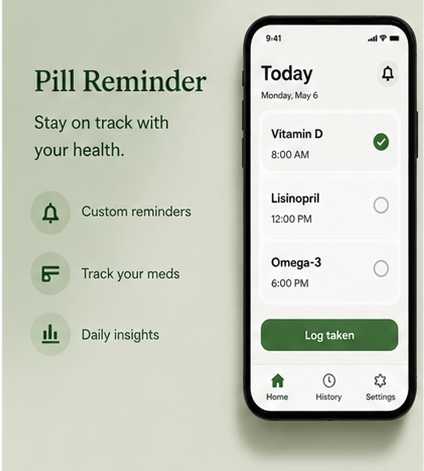
Screenshot of Thomas's pill reminder appApp

Pill reminder for dad

by Thomas, 47

Screenshot from Barbara's garden video projectVideo

My garden, every season

by Barbara, 71

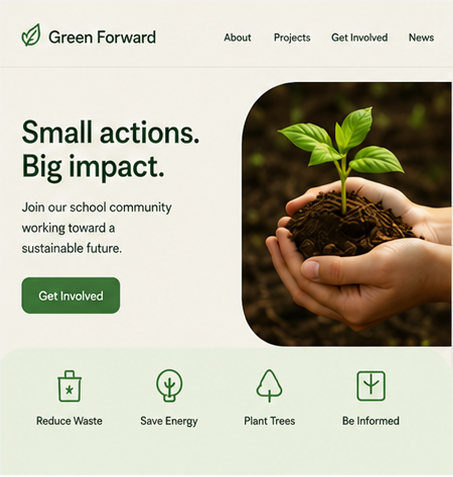
Screenshot of Millie's school climate club websiteWebsite

School climate club

by Millie, 13

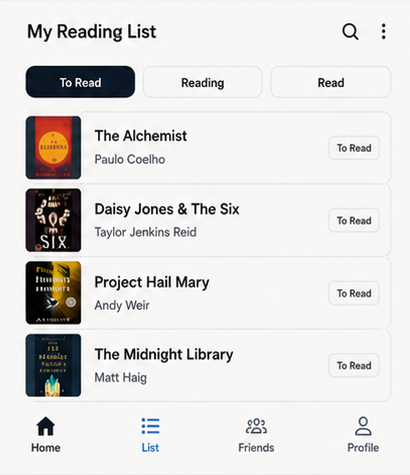
Screenshot of Catherine's reading list appApp

Reading list with friends

by Catherine, 52

Screenshot from Gerald's ramen cooking videoVideo

How to make ramen

by Gerald, 68

How we teach

Calm, creative, never condescending.

Think of it as a cook-along on video — except you're making something with AI. We show you what to click; your workspace is already prepared so you can focus on creating, not troubleshooting.

Luckycoin lucky cat mascot

"I ask the silly questions so you don't have to."

— your tutor cat

Non-technical welcome

We assume zero background in AI or computers. If something sounds confusing, we slow down and explain it properly.

Nothing to install

Your course workspace lives in the browser and is set up for you — apps open, accounts ready, tools in place.

Live on video

We share our screen and talk you through each step. You build alongside us and can ask questions anytime.

Leave with a finished piece

Every course ends with something real — a site, a video, an app — not a folder of notes you'll never open again.

The student wall

Pinned with pride.

A few notes left on our classroom wall. We refresh them every term.

"I built a website for my mum's bakery in one Saturday."

Oliver

age 15

First launch

"Honestly thought I was too old. I was wrong."

Margaret

age 68

Brave start

"My app reminds dad to take his medicine. He uses it every day."

Thomas

age 47

Family proud

"I made a 30s film about my cat. My class loved it."

Poppy

age 13

Mini director

"First thing I've built since I retired. Won't be the last."

Barbara

age 71

New chapter

"AI didn't replace me. It finally let me start."

Fiona

age 52

Started

Common questions

AI courses and e-learning without being technical — your questions answered

LuckyColin runs live AI courses and online e-learning for beginners across the UK. Everything happens in your browser with a real instructor — no coding, no downloads, and no IT setup on your machine.

Do I need to be technical or know how to code to join a LuckyColin AI course?
No. Our courses are built for everyday people who do not consider themselves technical. If you can use email and browse the web, you are ready. We explain everything in plain English with a live instructor on video — no jargon and no rushing.
Do I need to download or install anything before the course?
No downloads and no IT setup on your side. When you enrol, you receive access to a private cloud learning workspace with every app and tool already installed. You open a link in your browser on a laptop, tablet, or any modern device and you are in.
Can I learn AI online with no setup needed?
Yes — that is the whole point of LuckyColin. Most beginner AI courses still ask you to create accounts, install software, or wrestle with configuration before you start. With LuckyColin everything runs in your browser in a pre-configured environment, so there is zero setup. Open the link and start learning AI straight away with a live instructor guiding you.
How is LuckyColin different from free AI courses like Google AI Essentials, Coursera, or YouTube tutorials?
Free courses and YouTube tutorials are pre-recorded — you watch alone, set up your own tools, and get stuck with nobody to ask. LuckyColin is live and hands-on: a real instructor teaches you on video, every tool is already installed in your browser workspace, and you leave the session with a finished website, short film, or app you actually built. It is the difference between watching someone cook and cooking alongside a chef.
Which AI tools will I learn to use on a LuckyColin course?
You learn the practical, current generative-AI tools that matter — the same kinds of assistants people mean when they say AI, including chat and image tools for writing, design, video, and building simple apps. Everything is ready to use in your browser workspace, so you spend the session creating rather than signing up for accounts or comparing tools.
Who are LuckyColin AI courses for?
Curious teens, busy adults, retirees, and complete beginners who feel AI has moved on without them. We teach ages 12 to 92 in the same calm, patient style — often with grandparents and grandchildren learning similar skills.
How long are the live AI courses?
Most courses run 3 to 5 hours in a single live session or short series. You leave with something finished — a website, a short film, or a simple app — not a folder of notes you never open again.
What makes LuckyColin different from watching AI tutorials on YouTube?
You get a live instructor, a pre-configured workspace, and real-time help. It is a small workshop on video, not a lonely recording. We handle the setup so you can focus on creating.
Are LuckyColin courses available in the UK?
Yes. LuckyColin Tutoring AI is based in the UK and runs live online sessions suitable for learners across Britain and Ireland. All you need is a reliable internet connection and a modern browser.
Luckycoin lucky cat mascot

AI isn't replacing creativity.
It's letting more people start.

Non-technical? Perfect. You'll get a ready-made AI e-learning space in your browser and a live instructor on video — we run every class together.